

The Command Line Interpreter (CLI) may be used to drive the RBAC System APIs, to test, verify and understand a particular RBAC policy.
This document also resides here: README-CLI-AUTH
PREREQUISITES
Completed the setup described: README-QUICKSTART
Sample RBAC0 Policy
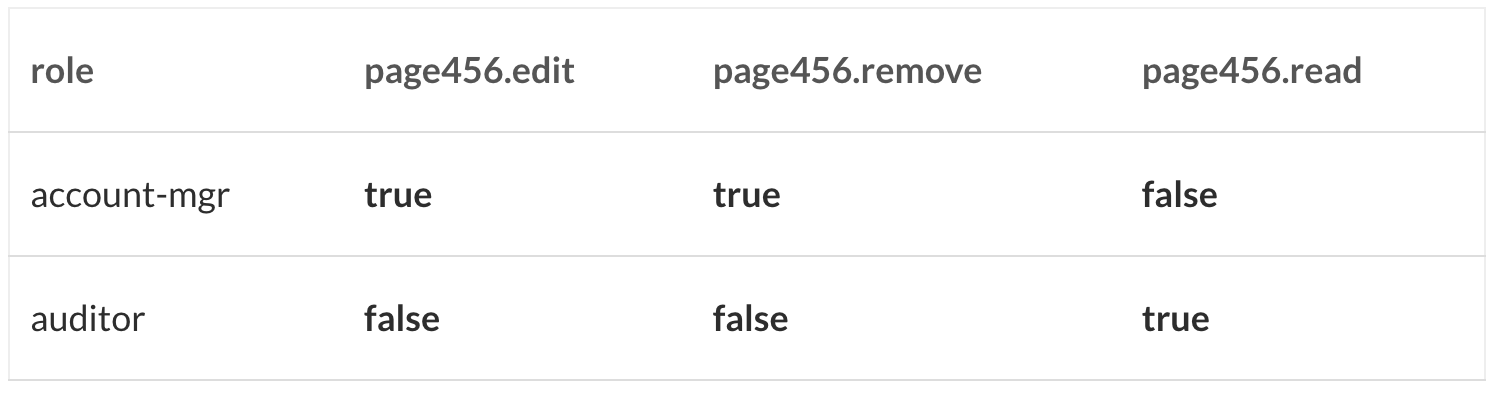
This tutorial covers the basics, RBAC Core: Many-to-many relationships between users, roles and perms and selective role activations.
py-fortress adds to the mix one non-standard feature: constraint validations on user and role entity activation.
The simple policy includes constraints being setup on user and role. Later we’ll demo a role timing out of the session.
USERS

ROLES
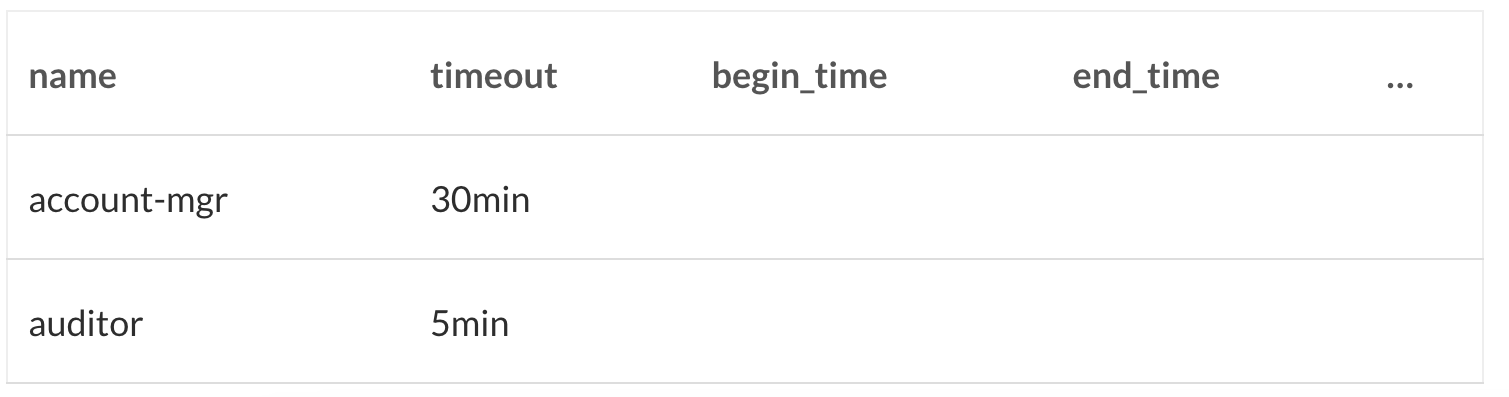
Constraints are optional and include time, date, day and lock date validations
USER-TO-ROLE ASSIGNMENTS

PERMISSIONS
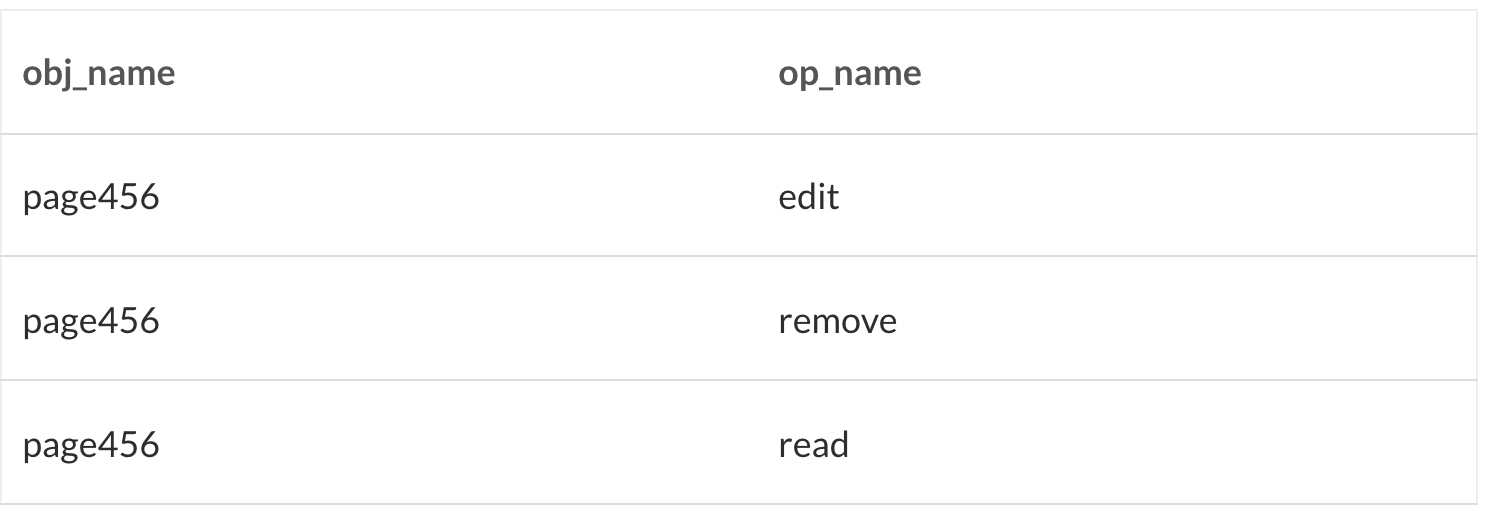
ROLE-TO-PERMISSIONS
__________________________________________________________________________________
GETTING STARTED
THE SYNTAX FOR TESTING PY-FORTRESS SYSTEM COMMANDS:
clitest <strong><em>operation</em></strong> --<strong><em>arg1 --arg2 ... </em></strong>
WHERE CLITEST EXECUTES A PACKAGE SCRIPT THAT MAPS TO THIS MODULE:
pyfortress.test.cli_test_auth
THE OPERATION IS (PICK ONE)
auth => access_mgr.create_session
check => access_mgr.check_access
roles => access_mgr.session_roles
perms => access_mgr.session_perms
add => access_mgr.add_active_role
drop => access_mgr.drop_active_role
show => displays contents of session to stdout
Where operations => functions here: access_mgr.py
THE ARGS ARE ‘–‘ + ATTRIBUTE NAME + ATTRIBUTE VALUE
–uid and –password from user.py
–obj_name, –op_name and –obj_id from perm.py
–role used for the role name
COMMAND USAGE TIPS
The description of the commands, i.e. required and optional arguments, can be inferred via the api doc inline to the access_mgr module.
This program ‘pickles’ (serializes) the RBAC session to a file called sess.pickle, and places in the executable folder. This simulates an RBAC runtime to test these commands.
Call the auth operation first, subsequent ops will use and refresh the session.
Constraints on user and roles are enforced. For example, if user has timeout constraint of 30 (minutes), and the delay between ops for existing session exceeds, it will be deactivated.
__________________________________________________________________________________
SETUP AN RBAC POLICY USING ADMIN_MGR CLI
To setup RBAC test data, we’ll be using another utility that was introduced here: README-CLI.md.
From the py-fortress/test folder, enter the following commands:
1. user add – chorowitz
$ cli user add --uid chorowitz --password 'secret' --timeout 30
user chorowitz has a 30 minute inactivity timeout
2. role add – account-mgr
$ cli role add --name 'account-mgr'
3. role add – auditor
$ cli role add --name 'auditor' --timeout 5
role auditor has a 5 minute inactivity timeout, more later about this…
4. user assign – chorowitz to role account-mgr
$ cli user assign --uid 'chorowitz' --role 'account-mgr'
5. user assign – chorowitz to role auditor
$ cli user assign --uid 'chorowitz' --role 'auditor'
6. object add – page456
$ cli object add --obj_name page456
7. perm add – page456.read
$ cli perm add --obj_name page456 --op_name read
8. perm add – page456.edit
$ cli perm add --obj_name page456 --op_name edit
9. perm add – page456.remove
$ cli perm add --obj_name page456 --op_name remove
10. perm grant – page456.edit to role account-mgr
$ cli perm grant --obj_name page456 --op_name edit --role account-mgr
11. perm grant – page456.remove to role account-mgr
$ cli perm grant --obj_name page456 --op_name remove --role account-mgr
12. perm grant – page456.read to role auditor
$ cli perm grant --obj_name page456 --op_name read --role auditor
________________________________________________________________________________
PERFORM CLI_TEST_AUTH.PY ACCESS_MGRCOMMANDS
From the py-fortress/test folder, enter the following commands:
1. auth – access_mgr.create_session – authenticate, activate roles:
$ <strong>clitest auth --uid 'chorowitz' --password 'secret'</strong> uid=chorowitz auth <strong>success</strong>
Now the session has been pickled in on file system in current directory.
2. show – output user session contents to stdout:
$ <strong>clitest show</strong> show <strong>session</strong> is_authenticated: True user: last_access: <strong>user</strong> cn: chorowitz constraint: system: [] roles: ['account-mgr', 'auditor'] dn: uid=chorowitz,ou=People,dc=example,dc=com <strong>uid: chorowitz</strong> internal_id: 552c1a24-5087-4458-98f1-8c60167a8b7c reset: [] sn: chorowitz User Constraint: name: <strong>chorowitz</strong> raw: chorowitz$30$$$$$$$ timeout: 30 User-Role Constraint[1]: name: <strong>account-mgr</strong> raw: account-mgr$0$$$$$$$ User-Role Constraint[2]: name: <strong>auditor</strong> raw: auditor$5$$$$$$$ timeout: 5 <strong>success</strong>
Displays the contents of session to stdout.
3. check – access_mgr.check_access – perm page456.read:
$ <strong>clitest check --obj_name page456 --op_name read</strong> op_name=read obj_name=page456 check <strong>success</strong>
The user has auditor activated so unless timeout validation failed this will succeed.
4. check – access_mgr.check_access – perm page456.edit:
$ <strong>clitest check --obj_name page456 --op_name edit</strong> op_name=edit obj_name=page456 check <strong>success</strong>
The user has account-mgr activated and this will succeed.
5. check – access_mgr.check_access – perm page456.remove:
$ <strong>clitest check --obj_name page456 --op_name remove</strong> op_name=remove obj_name=page456 check <strong>success</strong>
The user has account-mgr activated and this will succeed.
6. get – access_mgr.session_perms:
$ <strong>clitest perms</strong> perms <strong>page456.read:0</strong> abstract_name: page456.read roles: ['auditor'] internal_id: d6887434-050c-48d8-85b0-7c803c9fcf07 obj_name: page456 op_name: read <strong>page456.edit:1</strong> abstract_name: page456.edit roles: ['account-mgr'] internal_id: 02189535-4b39-4058-8daf-af0e09b0d235 obj_name: page456 op_name: edit <strong>page456.remove:2</strong> abstract_name: page456.remove roles: ['account-mgr'] internal_id: 10dea5d1-ff1d-4c3d-90c8-edeb4c7bb05b obj_name: page456 op_name: remove <strong>success</strong>
Display all perms allowed for activated roles to stdout confirms that user indeed can read, edit and remove from Page456.
7. drop – access_mgr.drop_active_role – auditor:
$ <strong>clitest drop --role auditor</strong> drop role=auditor <strong>success</strong>
RBAC distinguishes between roles assigned or activated and privileges can be altered in the midst of a session.
8. roles – access_mgr.session_roles
$ <strong>clitest roles</strong> roles <strong>account-mgr:0</strong> raw: account-mgr$30$$$20180101$none$$$1234567 end_date: none name: account-mgr timeout: 30 <strong>success</strong>
Notice the audit role is no longer active.
9. check – access_mgr.check_access – perm page456.read (again):
$ <strong>clitest check --obj_name page456 --op_name read</strong> op_name=read obj_name=page456 check <strong>failed</strong>
The auditor role was deactivated so even though it’s assigned, user cannot perform as one.
10. add – access_mgr.add_active_role – auditor:
$ <strong>clitest add --role auditor</strong> add role=auditor <strong>success</strong>
Now the user should be allowed to resume audit activities.
11. roles – access_mgr.session_roles:
$ <strong>clitest roles</strong> roles <strong>account-mgr:0</strong> raw: account-mgr$30$$$20180101$none$$$1234567 end_date: none name: account-mgr timeout: 30 <strong>auditor:1</strong> raw: auditor$5$$$20180101$none$$$1234567 timeout: 5 name: auditor begin_lock_date: success <strong>success</strong>
Notice the audit role has been activated once again.
12. check – access_mgr.check_access – perm page456.read (for the 3rd time):
$ <strong>clitest check --obj_name page456 --op_name read</strong> op_name=read obj_name=page456 check <strong>success</strong>
The auditor role activated once again so user can do auditor things again.
13. Wait 5 minutes before performing the next step.
Allow enough time for auditor role timeout to occur before moving to the next step. Now, if you run the roles command, the auditor role will once again be missing. This behavior is controlled by the ‘timeout’ attribute on either a user or role constraint.
14. check – access_mgr.check_access – perm page456.read:
$ <strong>clitest check --obj_name page456 --op_name read</strong> op_name=read obj_name=page456 check <strong>failed</strong>
Because the auditor role has timeout constraint set to 5 (minutes), it was deactivated automatically from the session.
END